Staff scheduling for shift-based teams
Stop scheduling
in spreadsheets
and group texts.
Your staff request shifts from their phones. You approve, assign, and backfill from one screen. Everyone knows exactly where they're supposed to be, and when.

Built inside a busy live-event venue. Running real shifts every week.
Not a startup's guess at how scheduling works. Every feature exists because a real manager needed it on a real night.
Sound familiar?
Scheduling shouldn't be the hardest part of the job.
The spreadsheet nobody trusts
Five versions, three editors, and one wrong cell that leaves you short on a sold-out night.
The group text that never ends
"Who's working Saturday?" buried under 200 replies. Half your team muted it weeks ago.
The 4 PM cancellation
Someone drops out the day of, and you're scrolling contacts trying to remember who's free.
How it works
From "who can work?" to a full roster in four steps.
Set up your team
Create your own departments and roles. Import your whole roster and full season of events from a CSV.
Open requests
Request windows open on their own each month. Set how many people each role needs, and cap requests if you like.
Staff tap to request
Each person sees only the shifts they're eligible for, and requests with one tap from their phone.
Assign and backfill
Approve with one click and set positions and call times. If someone cancels, the shift reopens on its own.
A look inside
What your staff see when they log in.
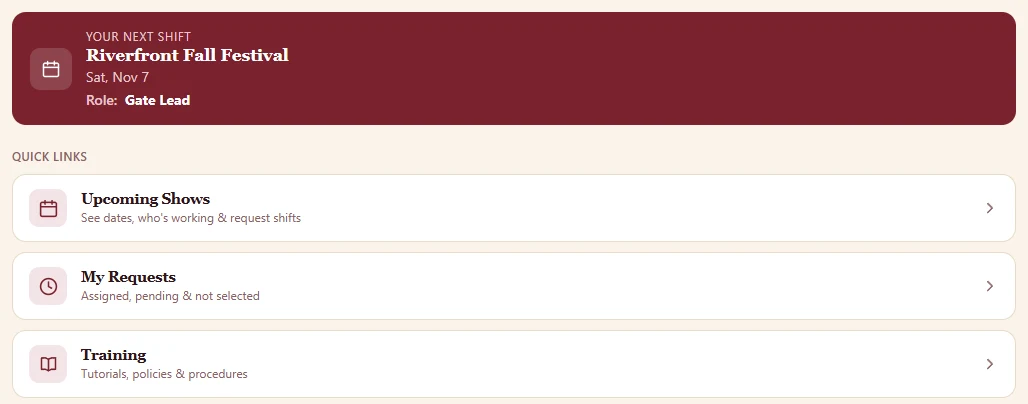
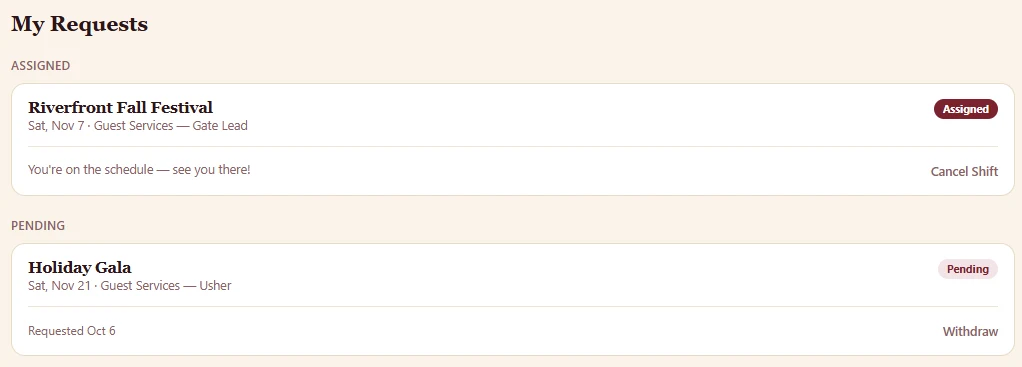
Built for everyone on the schedule
One system. Three views. Nobody sees more than they need.
Everything on their phone
- Their own secure login, no shared passwords
- One-tap requests, and withdraw just as easily
- A "Your Next Shift" tile that changes color on shift day
- Role, position, and call time for every assignment
- Self-service cancellation up to a cutoff you set
- Large Text mode for easier reading
Run their department from anywhere
- A mobile admin screen for just their department
- Approve or reject requests with one tap
- Set how many people are needed, and cap requests
- Force a role open or closed at any time
- Add staff and set positions and call times
- Leave shift notes the whole team sees
The whole operation, one screen
- Upload a full season of events in one file
- Review every pending request across every event
- Seven staffing reports, including Excel exports
- Daily staffing summaries emailed automatically
- Give managers admin access to only what they need
- Change settings without touching code
Reports
See who's short before it's a problem.
The Staffing Summary shows needed versus assigned for every upcoming event, by position. Run it any time, or have it emailed to your leadership team every morning.
- Event Summary with full request history
- Requests by date and role, built for fair assignments
- Login log, so you know who's actually using it

Messaging & team chat
The right message to exactly the right people.
Send an alert to everyone, one department, a single role, or one person. Choose banner, push notification, email, or all three. Messages can expire on their own.
Built-in chat rooms replace the group text, with read-only announcement rooms and trusted staff who can run their own rooms.
Who it's for
Made for teams that work in shifts, not 9 to 5.
Small and mid-sized organizations with part-time, seasonal, or volunteer staff who need to fill shifts quickly and fairly.
Nonprofits & volunteer groups
Let volunteers pick their own shifts, and see who hasn't logged in yet.
Event staffing
Gates, concessions, security, and cleanup, each with its own roles and headcounts.
Seasonal businesses
Load the whole season at once and turn accounts on when you're ready to launch.
Venues & performing arts
Ushers, bartenders, box office, and housekeeping, all on one calendar of shows.
Hospitality & food service
Positions, call times, and day-of notes that staff can see at a glance.
Camps, parks & attractions
Mobile-first for staff who are never at a desk.
And a lot more
The details that make it work on a busy night.
Questions
Good questions, straight answers.
Do my staff need to download an app?
No. It works in any phone browser, and staff can add it to their home screen so it opens like an app, with no app store involved.
Where does our data live?
On your own website. ReallyGoodCustomScheduler installs on WordPress, so your staff list and schedule stay on hosting you control.
Can we set it up for our departments and roles?
Yes. You create your own departments, roles, and colors. Nothing is hard-coded to one kind of business.
How much does it cost?
Pricing depends on your team's size and setup. Request a demo and we'll walk you through it.
Request a demo
See it with your own schedule.
Tell us a little about your team. We'll show you how it handles your shifts, roles, and busiest nights.